Skip to content
Business Card Scanner · Contacts to CRM

Stop losing leads to your desk drawer.

Snap a photo. AI extracts the contact. It lands in your CRM. Follow-up starts automatically.
Works on mobile and desktop Bulk upload LinkedIn integration
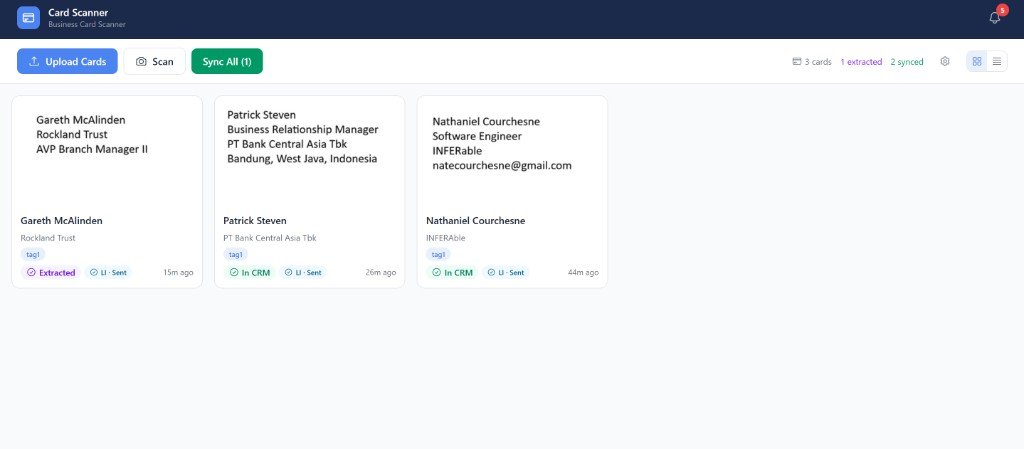
The After Networking dashboard showing scanned business cards extracted into contact records.

You collected 40 business cards at your last event. How many made it into your CRM? This app fixes that.

How it works

From card to CRM in seconds

Four steps. No data entry. No leads lost.

  1. Open the app

    Launch After Networking from your CRM sidebar.

  2. Snap a photo

    Take a photo or upload card images — single or bulk.

  3. Contact created

    The contact lands in your CRM with tags and custom fields mapped.

  4. Follow-up fires

    Your sequence kicks off — email, SMS, and tasks — automatically.

Automations

Workflows in GoHighLevel

Automations run inside GoHighLevel — not in this app

When you sync a card, GoHighLevel creates or updates a contact. To follow up automatically — for example, send a welcome email or queue a task — build a workflow in GoHighLevel. Workflows run on their own once the trigger conditions are met.

What workflows are

A workflow is an automated sequence of actions that starts when a trigger fires. They help you save time on follow-ups, reminders, and CRM updates without doing each step by hand.

Trigger

The event that starts the workflow — for example, Contact created, a form submission, or a tag applied.

Actions

What happens next: send email or SMS, create tasks, update fields, assign owners, and more.

How GoHighLevel expects you to build one

  1. Choose a trigger — In GHL, open Automation (workflows), click Add new trigger, and pick the event (for card syncs, Contact created is a common starting point).
  2. Refine with filters (optional) — Filters limit when the workflow runs. For contacts from this app, a tag filter keeps the automation scoped to the right people. Save the trigger when it looks right.
  3. Add actions — Click Add action and choose what should happen (email, SMS, task, etc.). You can chain several actions in one workflow.

Example: Email everyone from one expo

When you scan cards, tag each upload with the event name (for example techwest-2026 or whatever you typed as the tag in this app). That tag is how GoHighLevel knows they met you at that show — not another one.

In GoHighLevel, build one workflow per expo (or reuse a recipe and duplicate it): trigger Contact created, add a filter so the contact has that exact tag, then add a Send email action. Every synced contact who lands with that tag gets your follow-up; change the tag in the filter when you exhibit somewhere else.

Sample email (match the event in copy)

Subject: Great meeting you at TechWest 2026

It was great meeting you at TechWest 2026 — thanks for taking a card. [Add what you promised: calendar link, deck, coupon, etc.]

In the GHL email action, plug in merge fields so each contact sees their name; keep the expo name in the sentence so every send still references the event.

Swap TechWest 2026 for whatever expo name you use as the tag and in the message so the email always matches where you met them.

For publishing, testing, and troubleshooting (reentry, live tests, multiple triggers), see GoHighLevel's guide: Getting started with workflows.

What's included

Everything you need to capture every lead

AI card scanning

Pull name, email, phone, company, and title from any card.

Duplicate detection

Scan the same card twice — we merge it, no problem.

Bulk upload

Drop 50 cards at once after an event and walk away.

Card image storage

Every scan saved for reference — searchable later.

Custom field mapping

Send any value to any CRM field your team already uses.

Mobile and desktop

Scan in the field, manage from your laptop. Same data, same place.

LinkedIn integration

Send connection requests to fresh contacts without leaving the app.

Built for anyone who networks

Turn cards into customers — automatically.

Stop typing. Start following up. Get every lead from your next event into your CRM the moment you scan it.

Open the app